
 Remotion
 HyperFrames
MOTION.md What is this?
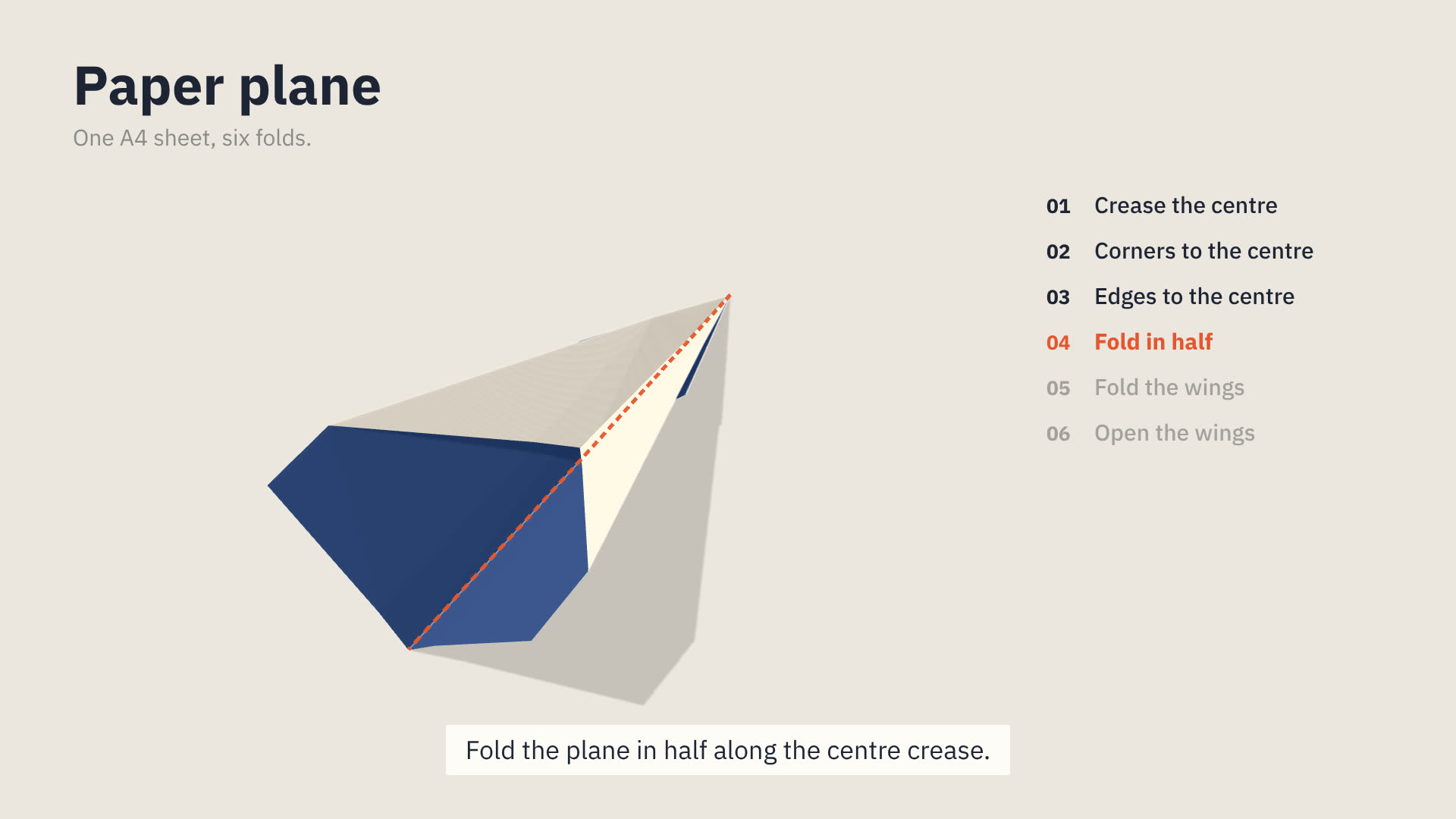
Raw · GitHubOne sheet of paper on a pale table, folded in 3D, one step at a time. Before each fold its line is drawn on the paper in the accent, in the notation of fold diagrams; then the paper folds along it; then it rests while the step is read. The folding is solved, not animated by hand: the paper keeps its size, layers fold together, and the model that comes out is the real one.
Essence, and what it is not
- One sheet, two sides: a coloured front (
front) and a white back (back). Every shape in the film is that sheet, folded. Nothing is added, cut or glued. - The next fold is shown before it is made: its line drawn on in the accent, valley dashed, mountain dash-dot. Then the fold, then a rest.
- Folding is the motion. The paper moves only as folding moves it, and the camera moves slowly round it.
- A finished model is turned to be looked at, in 3D, with its shadow on the table.
Not a paper-cut or collage (nothing is cut or stuck on), not a flat 2D tutorial (the paper is 3D, lit, casting shadow), not a product render (no studio gloss, no reflections; paper is matte), not a morph (the sheet never stretches or melts into the next shape). Of the motions here it is closest to Clay World (a lit 3D tabletop), but Clay World models many soft objects and this has one sheet that is only folded; to Plumb Line (paper at depth), but Plumb Line cuts and stacks sheets and nothing here is cut; and to Lab Notebook (an explanation built step by step), but there a drawing explains a thing, and here the paper is the thing being made.
Ground and material
FoldStage draws the ground: the table (table), a soft key light from the upper left, a faint shadow under the paper. Paper is matte and faceted: each flat region is flat, every crease is sharp. Folded creases stay on the paper as fine pale marks (back). Folded flat, layers keep a hair apart; they never pass through each other.
Colour
front,back: the paper's two sides. They are the only large colours on screen. Which side shows tells the viewer where they are in the fold.now: the accent. Only the fold about to be made (its line on the paper) and the step in hand (in the step list). One accent thing at a time; never decoration, never a title.ink: titles, steps already done, the sheet's outline in a crease pattern.pencil: subtitles, steps to come, labels.table: the ground. Nothing else is coloured; there are no gradients or backgrounds behind the table.
Type
IBM Plex Sans (sans) for every word; Noto Sans SC for Chinese. The model's name 64 to 80 px, weight 700, top left; a one-line subtitle 28 to 32 px in pencil under it. Step titles 28 to 34 px (StepRail). Captions use the motion's caption tokens (Caption from @motionhub/runtime), one sentence, at the bottom. No word ever sits on the paper.
Motion
A step is three beats, in this order, never overlapped:
- Mark (
duration.mark, about 0.9 s): the fold line draws itself on (FoldStagemark.draw0 → 1), the step list moves to this step. - Fold (
duration.fold, 1.4 to 2.2 s):atgoes from n − 1 to n, linearly; the solve already eases each fold. Keep the mark on during the fold. - Hold (
duration.hold, at least 1 s): nothing moves but a slow camera; the mark fades to a third. The caption for the step stays until the hold ends.
A precrease (fold then open) takes about 2.6 s in its fold beat. A step that only reopens or turns the paper has no mark. The camera starts high (el about 50°) over the flat sheet, comes lower (25° to 30°) once the model stands up, and closes in (zoom 1.3 to 1.6) as the model gets smaller; camera moves ease with easing.camera and never move during a mark. At the end, the finished model is walked round: az sweeps 200° to 320° over 4 to 6 s, the step list gone.
Never cut between states of the paper: every change of shape is a fold the viewer sees.
Composition
The model sits left of centre while a step list (StepRail) stands at the right (FoldStage shift about 190 px); the title at the top left; the caption at the bottom centre. For a finished model, the list leaves and shift returns to 0. A crease pattern (CreasePattern) can stand alone in a scene, or beside the stage at the start or the end.
Components
All in react/parts/. Read each file's meta for its parameters.
- ground — Fold stage (
stage.tsx,FoldStage): the sheet folding in 3D. Props:model,at(steps done, fractional),mark{step, draw, opacity},az,el,zoom,shift,creases,baked. Fits: every scene with the paper. - steps — Step rail (
rail.tsx,StepRail): the model's steps, numbered; done in ink, in hand in the accent. Props:model,at,step,size. Titles of three or four words: atsize30 the rail needs about 520 px from its left edge, so keep it inside the frame. Fits: beside the stage while folding. - compare — Crease pattern (
pattern.tsx,CreasePattern): the unfolded sheet with its creases, one step drawn in the accent. Props:model,width,upTo,draw,highlight. Fits: "all of this is in one sheet"; where a step's creases fall. - data — Models (
models.ts): traditional models as steps:paperPlane(the classic dart, six steps, A4). Read it as a worked example ofprecrease,layers,freeandreopen. - Engine (
fold.ts):ModelDef,foldModel,sequence,whereIs. The components call it; a film only calls it to write or check a model. - Bake (
bake.ts, Node only):bakeModels(models, target)checks each model, step by step, and writes its solve to a JSON file; its header has the three-line script. Import the JSON and passbaked={baked.myModel}toFoldStage: renders skip the solve.
FoldStage and StepRail take the same at. at alone cannot tell a step's hold from the next step's mark (both are at = n), so pass StepRail the step in hand: step n through its mark, fold and hold.
Writing a model
A model is a ModelDef: {name, sheet: [w, h], steps}. The sheet lies from (0, 0) to (w, h), x right, y up, front facing you. A step is {title, say, folds, precrease?, angle?, turnOver?, reopen?, free?}; a fold is:
{line: [[x1, y1], [x2, y2]], moving: [x, y], as: 'valley' | 'mountain', layers?: ([x, y]) => boolean}lineandmovingare where the paper lies now, after the steps before: a line through the folded paper, and a point on the side that moves. A fold through several layers folds them all, unlesslayerslimits it.as:valley(default) brings the moving part up toward you;mountainsends it behind. Diagrams that say "fold behind", "away from you" or "in half with the folds outside" meanmountain; forgetting it puts the work of earlier steps inside the model, where nobody sees it.layers: tested on each layer's centre in the unfolded sheet's coordinates, to fold only some layers (one flap of two, the near wing).precrease: truefolds and opens again.anglefolds less than flat (degrees).turnOver: trueturns the paper left to right first, about the middle of where it lies: a point at x moves to lo + hi − x (lo, hi: the paper's left and right edges then), so the step'slineandmovingare written where the paper lies after the turn.reopen: [{step, angle}]opens earlier steps' creases to an angle (wings level, a box's walls up).- Several folds in one step happen together (both corners at once).
- The paper lies on the table: in each step the side that does not move stays where it is, as under a person's hand.
free: truelifts it instead: the fold's line stays put and both sides rise alike, as when a plane is folded in half to stand on its keel. A step that only reopens holds the innermost crease it opens the same way. - To place a later line,
whereIs(model, afterStep, [x, y])gives where a point of the unfolded sheet lies after that many steps. Run the engine in Node to check a model before filming it:sequence(model).chordslists every crease with its step.
What the engine folds and what it does not: every step is a straight fold through some or all layers, flat or to an angle, and reopen shapes the result. A model ends as the steps leave it, mostly flat: a cup, a box or a balloon that is finished by opening a pocket, pulling layers apart or inflating cannot take that last 3D shape. Show such a model finished flat, from above or low and close; do not try angles until it looks opened. A model folded on a diagonal lies at 45°: turn the camera (az 45 or 225) to stand it upright on screen, rather than rewriting the model.
Traditional models only (cranes, planes, cups, boats, boxes, hats); a modern designer's model is their work.
Sound
Optional, from react/sound.json: a dry scratch as a fold line is marked (draw), a short paper swish over the fold (move), a soft tap as it lands (land), one low wooden note when the model is finished (count), over a quiet pad. No music is part of the motion.
Native moves
- Mark, fold, rest. The next fold drawn on, made, held. Fits content like: any procedure in steps; assembling a flat-packed thing; a recipe's order of work.
- Through the layers. One line folds a stack at once, every layer finding its own valley or mountain. Fits content like: why order matters; how one action propagates through layers; a stack of paper folded into a booklet.
- Turn it over. A half turn shows the other side, and the other colour. Fits content like: the other side of an argument; what is underneath; a reveal.
- Walk round the model. The finished model turned slowly, low over the table, its shadow under it. Fits content like: the result; a structure from every side.
- Open it back out.
CreasePatternbeside the folded model: everything the model is, on one flat sheet. Fits content like: compression; how much a small thing holds; a plan and its result.
Avoid: pitfalls
- Folding without marking first: the viewer cannot follow. Fix: mark every step with creases, before
atmoves. - Two accent things at once (a red title, a second marked step). Fix: the accent is the fold in hand and its step only.
- A fold too fast to read (under 1.4 s) or a hold under 1 s. Fix: mark, fold, hold, each its full beat.
- Text on the paper, or arrows floating in 3D. Fix: words live in the title, the step list and the caption.
- Moving the camera while a fold is marked or made fast. Fix: keep camera moves slow and between steps.
- A model written with lines in the unfolded sheet's coordinates after the first fold. Fix:
lineandmovingare where the paper lies now; usewhereIsand check the chords in Node.
Rendering
FoldStage draws with three.js (WebGL): install three, and render with --gl=angle, or --gl=swangle on a machine without a GPU. Each render tab solves the model before its first frame: under a second for the dart, ten seconds or more for a model with many layers. A baked model skips that: bakeModels (bake.ts, in Node) lists each step's creases, so a step that folds nothing shows at once, and writes the solve to a JSON file for FoldStage's baked. Bake again whenever the model changes. Without a GPU a full-size render takes about four times as long as one at --scale=0.25: look at the whole film at that scale before rendering it full size.
Freedom in each work
Each film decides its model, its story, how many steps it shows and whether it ends on the crease pattern, the walk round, or something the model does. Three far-apart structures: one model folded from flat to finished; the same sheet folded two ways to compare them; a finished model opened back to its crease pattern.