
 Remotion
 HyperFrames
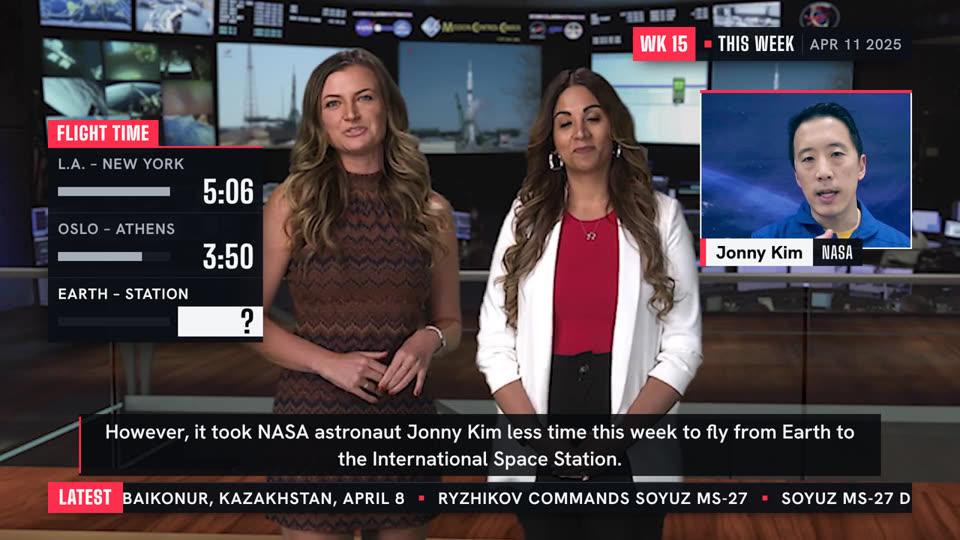
A broadcast graphics package over someone's own footage. The recording is the programme; the package is the channel's furniture around it. One channel red.
Essence, and what it is not
- A package, not loose tags: every piece is the same three strips, cut square and aligned: a red bar or block at its leading edge, a white plate with ink type, an ink strip with white type beneath, as wide as the plate.
- Furniture stays on air: a corner bug and a ticker crawl hold through the whole piece and change in place.
- Things push on in layers, red first: the red block, the plate out of it, the type up into its plate, the strip beneath. Nothing fades in.
- Figures are a scoreboard's: condensed, set big, their digits rolling or ticking up as they are said, the one that matters in red.
- A framed, named window opens on a second picture when a person or place is mentioned.
Not On Air (rounded dark tags, no furniture), not Stage Light (its own dark stage; here the footage), not Marker Margin (no hand), not an explainer, not a meme edit.
Ground and material
The recording is the ground; the motion draws none. The material is print-flat: white plate (text), ink strip (panel at 94 %), red block (data), a short soft shadow. Square corners; no gradient, glass or glow. The only blur is speed; the only light, one glint. The window: a white keyline, a red top edge.
Colour roles
data: the channel red, the only accent: every tab, bar and block, the bug's mark, the ticker's label, the one row or name that matters, the caption's rule.text: the white plate (names, headlines, figures that matter) and white type on ink.bg: ink type on the white plate.panel: the ink strip.panel2: an empty bar's track.muted: what is not the point (the other rows' bars and labels, a dateline).
Type and captions
Big Shoulders Display, condensed capitals, for every tab, label, surname, place and figure: tabs 36 to 40 px black, figures 56 to 170 px with tabular digits. Hanken Grotesk for names on plates (48 to 52 px extra bold), headlines (50 px), roles and datelines (30 px spaced capitals) and the ticker (33 px bold capitals). Chinese: Noto Sans SC for both. Sizes are for 1080 lines; nothing read under 30 px. Captions are closed captions: white 40 px on an ink box, square, a red rule on the left, above the ticker.
Motion
Shoot out, brake hard. A piece enters in layers over 1 to 1.2 s: the red edge first, then the plate shoots out from behind it (quartic out), leaning into its travel and blurred while it moves, sharp the frame it lands; the type rises into it, the strip follows, and one glint crosses the red. Words change by rolling in place (0.4 s). Bars grow with a white tip; digits spin and blur, landing sharp. One stinger a film at most, between segments; the bug and ticker stay above it. The ticker alone moves at constant speed. Leaving is the entrance reversed (0.35 s), or the cut.
Composition and framing
Title-safe: 96 px from the sides, 54 from the top. The bug holds the top-right corner and the ticker the foot (y 964 to 1026) for the whole piece; captions sit above the ticker. Straps sit on the lower third, under the person they name, against the near edge; a board or a roll call stands in the column the shot leaves free beside the speaker; the window opens in the other. Keep faces clear, every piece above a two-line caption (y 800) and a gap under the bug. At most two pieces besides the furniture. Nothing goes on the corner where a shot carries its source's mark, nor on a frame that is already designed.
Sound
None. The recording carries the voice and its own music.
Components
- data — Stat block (
react/parts/readout.tsx): One figure on a white plate, its digits spinning into place as it is said. Fits: the figure a story turns on - data — Score bar (
react/parts/scorebar.tsx): A board in the free column: rows tick up as said, the one that matters in red; a row can wait as a question and win with a badge. Fits: times, prices or scores read out; a figure held back - mark — Locator (
react/parts/locator.tsx): A place super: red bar, place on a white plate, region and date beneath. Fits: footage from elsewhere; a dateline - open — Channel bug (
react/parts/bug.tsx): Corner bug: the mark on a red block, state and date on ink; stays on air, flips its state in place. Fits: a show or week; live or replay - steps — Roster (
react/parts/roster.tsx): A roll call: per name, a red number drops and the plate shoots out. Fits: a crew, a panel, a line-up - steps — Ticker (
react/parts/ticker.tsx): A crawl along the foot behind a red label; stays on air. Fits: the week's other items; a story's facts - term — Name strap (
react/parts/strap.tsx): Lower-third name strap: a red bar, the white plate shoots out from behind it, the role strip follows. Fits: a host or guest; two in a shot, one each - title — Headline strap (
react/parts/headline.tsx): A headline plate shot out from behind a red category tab; its words roll over in place. Fits: what a passage is about; a story that develops - transition — Picture in picture (
react/parts/pip.tsx): A second clip swings open in a framed window as someone or somewhere is mentioned, named on its strap. Fits: someone mentioned who is not in the shot; a place - transition — Stinger (
react/parts/sting.tsx): The one full-frame move: slanted white, red and ink bands sweep across, cover the cut with a huge word, and sweep on. Fits: studio to archive; the next story; results
Native moves
- Name on the name. A strap shoots out as the name is said, under that person; two in a shot get one each. Fits content like: two hosts; a guest; a reporter.
- Open a window on it. A second clip swings open beside the speaker as someone or somewhere is mentioned. Fits content like: the astronaut they speak of; a factory; a caller.
- Tick the score. Rows open on their labels and tick up on their figures; one can wait as a "?", then win with a flash and a slammed badge. Fits content like: times compared; prices; a result held back.
- Roll call. Names shoot out one by one down the free side, numbered in red. Fits content like: a crew; a panel; finalists.
- Sting the handover. Slanted bands sweep across and cover the cut from studio to footage with one huge word. Fits content like: REPLAY before archive; the next story; the results.
- Flip, don't leave. The headline, the bug's state or a strap rolls to new words in place when the story moves on. Fits content like: LIVE to REPLAY over archive; launch to docking; a score that changes.
- Hold the furniture. The bug and ticker come on with the first words and stay to the end. Fits content like: a round-up; a results show; a briefing.
Avoid: pitfalls
- A strap over a face or hands. Fix: under the person, at the near edge.
- A board mid-frame. Fix: the free column, rows stacked.
- The caption again on a strap. Fix: a name, a figure, a short headline.
- A crawl that gives away a held-back figure. Fix: keep it out of the ticker.
- Furniture that comes and goes. Fix: on once, and it stays.
- Everything red. Fix: red is a block or the one row; words sit on white or ink.
- A piece over the source's mark or the show's own titles. Fix: another corner, or nothing on that frame.
Freedom in each work
Each video decides its mark and state, the ticker's lines, which names earn a strap, whether a window opens, the ending. Three far-apart uses: a weekly briefing to camera with a board of figures and a window on the people it mentions; an interview where one strap and one headline flip through the answers; a results recap where the board returns after each item and the ticker carries the rest of the table.