
 Remotion
 HyperFrames
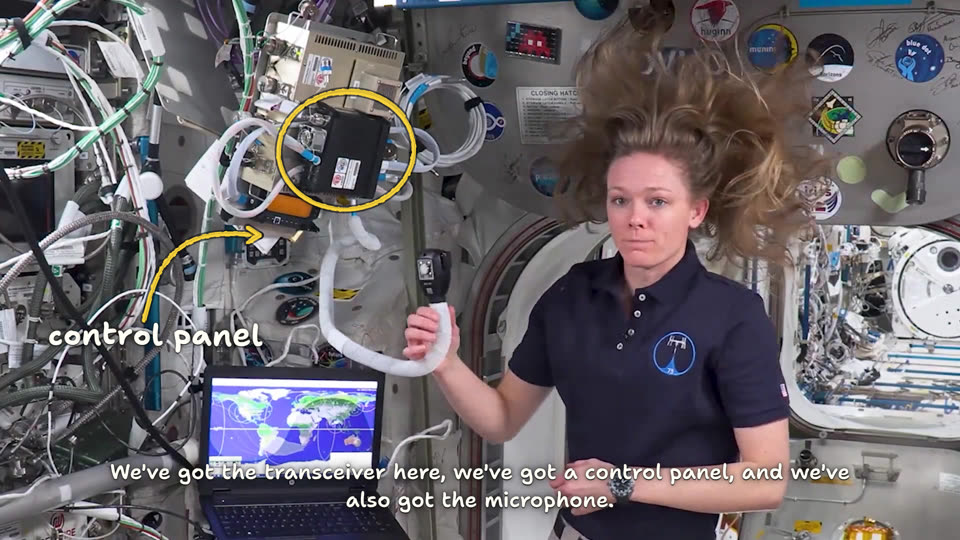
A felt-tip marker on the glass in front of someone's own footage or screen recording: as they talk, a quick hand loops what they name, flicks an arrow from a scribbled word, underlines the word they stress. The footage stays the picture.
Essence, and what it is not
- Everything is drawn by one hand, live: no card, no box, no typeset label. A mark appears as a stroke being made, never as a finished shape.
- Two pens: a fluorescent yellow marker for every mark (loops, arrows, underlines, ticks, brackets), white for every word.
- Marks pile up through a shot and are wiped clean at the cut, the way a pundit clears the screen; only a to-do in the corner survives cuts.
- Strokes are imperfect on purpose: loops overshoot their start, arrows bow, underlines rise to the right, letters bounce.
Not On Air (solid ink tags with printed type; here every word is handwriting), not Red Pencil or Lab Notebook (they draw on their own paper; this draws on the person's picture), not a whiteboard (no ground, no diagram built from nothing), not a meme edit (no stickers, emoji or shaking text).
Ground and material
The recording is the ground; the motion draws none. The material is marker ink on glass: a wet core, a darker streak where the felt drags, a slightly frayed edge, and under every stroke and letter a thin keyline of the footage's own darkest tone (bg at about 60 %), which keeps it legible on a bright wall or a black sky without a panel. loop.tsx exports the stroke every mark uses, note.tsx the hand.
Colour roles
data: the yellow marker. Every mark, and a unit beside a figure. Never a fill, never a word longer than a unit.text: the white pen. Every word, figure and step.bg: the keyline under every stroke and letter, and the dim behind a screen recording.
Type and captions
Shantell Sans for everything: handwriting is its display with the informal and bounce axes turned up (hand in marker.ts), so letters sit unevenly as a quick hand writes; captions are the same face upright, sans. Words 56 to 72 px, a figure 130 to 170 px, steps 50 to 56 px at 1080 lines. Chinese: LXGW WenKai, which reads as a hand too. Captions: white Shantell, no box, a heavy dark keyline, near the bottom, like the words of the marks.
Motion
Every mark is drawn on the word it belongs to, in the order a hand makes it: a loop in about 0.4 s, an underline in 0.35 s (fast, or it reads as a loading bar), an arrow's shaft then its head flicked on in the last tenth, a word letter by letter at about 0.07 s a letter. Strokes start fast and slow into their end. Who, then what, then the word: the loop before the arrow, the arrow before its label. Nothing moves once drawn: a mark holds still until the cut, and goes with the cut (dur={0}), never fading. A mark on a moving shot moves with the shot (Tween on the part's x, y).
Composition and framing
Mark the thing itself: a loop round the object in the hand, not a drawing of it. Words go where the shot is empty (a wall, the sky, a letterbox margin), never over a face or the hand holding the object, and lean a few degrees. At most three marks at once, then the cut cleans the glass. Text 5 % in from every edge and above the captions. The steps keep to the free top corner of each shot, away from the person; they step aside while a screen recording is in and catch up as it leaves. A screen recording takes the middle 74 % of the frame, turned a few degrees toward the speaker; its marks are drawn in its own pixels so they turn with it.
Sound
None. The recording carries the voice and its own music.
Components
- data — Figure (
react/parts/figure.tsx): A number written large where the shot has room, its unit in marker, double-underlined as it lands. Fits: a speed, a price or a size said to camera - data — Span (
react/parts/span.tsx): A bracket from one point of the shot to another, ticked at both ends, how long or how far written beside it. Fits: horizon to horizon; the length of a cable; a stretch of a timeline - link — Arrow (
react/parts/arrow.tsx): A word scribbled in a free corner, then an arrow flicked from it to the thing; as a wave, a signal between two. Fits: a part they point at; the link across a split screen - mark — Box (
react/parts/box.tsx): A rough box round a region of a screen or shot, four quick strokes overshooting the corners. Fits: the row or field of a screen recording that matters; a label - mark — Click (
react/parts/click.tsx): Where the cursor clicks, a small ring and a burst of four strokes, so the step is seen as it happens. Fits: the button pressed in a walkthrough; a switch flipped on camera - mark — Loop (
react/parts/loop.tsx): A loop scribbled round the thing in the shot as it is named, running on past its start. Fits: the gadget in their hand; a dial they point at; one face in a crowd - steps — Steps (
react/parts/steps.tsx): A to-do down a free corner, each number looped as it is reached and ticked when done; it stays across cuts. Fits: the steps of a set-up, a recipe or a walkthrough - term — Note (
react/parts/note.tsx): A few words written by hand beside the thing, one underlined the moment it is said. Fits: a name or a place the shot shows; the word that matters - transition — Screen (
react/parts/screen.tsx): A screen recording swung in over the dimmed footage at a slight angle, still playing, its corners caught in marker. Fits: the app or page they talk about; what the camera cannot show
Native moves
- Loop it as it is named. Fits content like: the transceiver on the wall; a port on a laptop; one face in a group.
- Word, then arrow. A word in a free corner, an arrow flicked to the thing. Fits content like: "control panel"; "this one" across a shelf; "new!" toward a button.
- Underline the stressed word. Fits content like: "Columbus lab" as it is named; "25× the speed of sound"; "only one".
- Write the number big, double-underlined as it lands. Fits content like: a speed over a sky; a price over an unboxing; a weight on a scale.
- Measure it. A bracket ticked at both ends, with how long or how far. Fits content like: horizon to horizon; a cable's length; a stretch of a timeline.
- The signal between them. A wave headed at both ends. Fits content like: a radio link in a split screen; a call between two phones; a hand-off.
- Step, tick, next. The corner to-do: written and looped when reached, ticked when done. Fits content like: a set-up; a recipe; a pre-flight check.
- Box the row, ring the click on a screen recording. Fits content like: the setting to change; the pass to pick; the button that starts it.
Avoid: pitfalls
- A mark over the face or the hand holding the object. Fix: loop the object only, write on the other side.
- A mark left across a cut, now pointing at the wrong thing. Fix: end it on the cut with
dur={0}; place it again if it still matters. - A mark before its word: the picture explains ahead of the person. Fix: anchor every mark on its word.
- A loop or underline slower than 0.6 s reads as a progress bar. Fix: quick strokes that hold.
- Over three marks at once is a scrawl; a sentence by hand is a caption twice. Fix: wait for the cut; two to five words.
- A mark on a frame already designed (a title, an end card). Fix: nothing on it.
Freedom in each work
Each video decides which moments earn a mark, which pen writes, whether a walkthrough keeps steps in a corner, and whether a screen recording comes in at all. Three far-apart uses: an unboxing to camera where every part is looped as it comes out of the box and the price is written big at the end; a screen-recorded set-up whose steps tick down one corner while each click is ringed; a reaction to a match clip with only arrows, words and one measured run.