
 Remotion
 HyperFrames
Solid ink tags laid on someone's own footage. The person and their shots are the picture; a tag names, counts or points at what they are saying, then gets out of the way. One signal colour marks what matters.
Essence, and what it is not
- The footage is the ground; a tag sits on a shot the way a label sits on a box.
- Tags are solid and dark, so they read on any shot, and small: never more of the frame than the person's head.
- One signal colour, a clear teal, on the one thing a tag is about: an edge, a unit, a ring, an underline.
- Things point at the footage itself: a ring round the sticker on the laptop in their hands, not a drawing of a laptop.
Not a news ticker (no scrolling bars or permanent frames), not a meme edit (no stickers, emoji or shaking text), not an explainer (no scenes drawn over the person; the inset frames them and keeps them playing).
Ground and material
The recording is the ground; the motion draws none. A tag is ink (panel at 90 %), 4 px radius, a short drop shadow. Where a shot is too bright behind a tag, scrim.tsx shades that edge only; where it is too busy for any tag, inset.tsx frames it and lays ink beside it. Nothing is glassy, blurred or glowing.
Colour roles
data: the signal teal, the one accent: an edge, a unit, a ring, an underline, the item being said, a winner, a plus.text: warm white for what a tag says.muted: what is no longer the point (a struck word, the loser, a minus).bad: only the stroke through a word that is wrong.panel: the ink of every tag; teal is a line or a word, never a tag's fill.
Type and captions
Atkinson Hyperlegible Next for all a viewer reads: names 50 px bold, figures 112 px extra bold with tabular digits, headlines 58 px, labels 38 to 48 px. JetBrains Mono, spaced and in capitals, for the line over a tag (26 px, teal). Chinese: Noto Sans SC. Sizes are for 1080 lines; scale to the recording. Captions: white bold 40 px on a dark box (74 % ink) near the bottom.
Motion
Tags open; they do not fly. An edge rises, then the tag wipes open; a figure rises 24 px while it counts up on its words (0.8 to 1.2 s, easing out); a ring draws, then its leader, then its label; items and bars come one per word. Everything starts on the word that names it or on the cut that shows it. Leaving is a 0.3 s fade at the end of its line; on a cut it goes with the cut (dur={0}), since a fade runs into the next shot. Nothing loops or drifts: the footage moves.
Composition and framing
Place each tag in the room its shot leaves: a lower third away from the face, a figure over a wall or sky, a label beside what it rings. Keep the face and hands clear, and text 5 % in from every edge. At most two tags at once, plus a chapter tab. A tag that outlives a cut is placed again or leaves with it. Captions keep the band below 84 %. The inset is for a stretch, not a moment: once out, tags go on its ink side.
Sound
None. The recording carries the voice and its own music.
Components
- close — Verdict (
react/parts/verdict.tsx): A scorecard: each point opens on its words, a teal plus or a quiet minus; the verdict is ruled off below. Fits: the pros and cons a review ends on; a recap of what was tested - compare — Swap (
react/parts/swap.tsx): What one would assume, struck through, and what is true written after it in teal. Fits: a "looks the same, but" turn; a belief corrected; an old price replaced - compare — Versus (
react/parts/versus.tsx): Two tags across a small "vs"; when the speaker decides, the winner takes the teal edge. Fits: two products weighed; before and after; the old way and the new - data — Bars (
react/parts/bars.tsx): Two to four amounts as bars on one tag, each growing on its words; the one that matters in teal. Fits: prices or scores of a few products; a benchmark read out - data — Figure (
react/parts/figure.tsx): One figure on a tag, counting up on its words, its unit in teal and what it counts above. Fits: a price, a size or a count the speaker says - ground — Scrim (
react/parts/scrim.tsx): A soft shadow over one edge of the shot, so tags on a bright or busy picture stay readable. Fits: a sunny exterior under a tag; captions over a busy floor - mark — Callout (
react/parts/callout.tsx): A ring drawn around something in the shot, a leader out to a short label. Fits: a sticker, a port or a button on the product in hand; a sign they mention - open — Chapter tab (
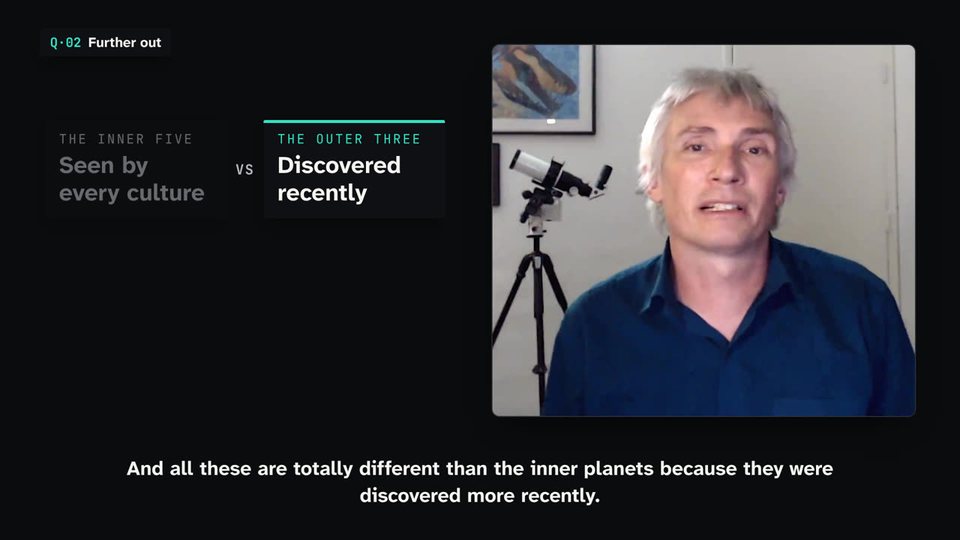
react/parts/chapter.tsx): A small tab in a top corner naming the part of the video, its number in teal; it stays for the part. Fits: the sections of a review; the steps of a tutorial; an interview's questions - quote — Quote (
react/parts/quote.tsx): A few words written out on a tag behind a teal quotation mark, with their source below. Fits: a line from a spec sheet, a maker or a review they cite; the sentence the video turns on - steps — Chips (
react/parts/chips.tsx): Short items in a row of tags, each opening when it is named; the one being said has the teal edge. Fits: two to five things listed aloud: uses, features, reasons - term — Name tag (
react/parts/name-tag.tsx): A lower-third tag naming who or what is on screen: a teal edge rises, then the tag wipes open. Fits: a person introduced; a product or model named; a place the shot shows - title — Headline (
react/parts/headline.tsx): The point of a passage in a few words on a tag, the key words underlined in teal as they are said. Fits: what the speaker concludes; the question the video answers - transition — Inset (
react/parts/inset.tsx): The recording draws itself into a framed window on one side, still playing; the rest becomes ink for tags. Fits: a stretch of points or a comparison beside the speaker; a recap; a shot too busy for tags
Native moves
- Name it as they say it. A name tag opens on the name, for the sentence about them. Fits content like: an expert introduced; a product model read out.
- Ring the thing in the shot. A ring round the detail they point at, a leader to a few words. Fits content like: the sticker on a laptop; a port on a phone's edge.
- Count it as they say it. A figure counts up on the words that say it. Fits content like: a price; a memory size; a distance run.
- Strike and correct. What one would assume, struck, then what is true. Fits content like: "it looks the same, but inside it is different"; a myth corrected.
- Weigh two. Versus or bars, the winner in teal when they say it. Fits content like: this laptop against last year's; three prices read out.
- Step aside for the summary. The inset frames the recording while a verdict or list fills the ink beside it. Fits content like: the pros and cons at the end of a review; a recap of the three points.
Avoid: pitfalls
- A tag over the face or the hand holding the product. Fix: the other side, or the next shot.
- Text the video already shows (its own price card, title, end card). Fix: nothing on a designed frame.
- The caption again on a tag. Fix: a name, a figure or a few words, never the sentence.
- A tag kept across a cut onto something. Fix: place it again, or let it go on the cut.
- The inset in and out within a few seconds. Fix: hold it for a stretch, or use a tag.
Freedom in each work
Each video decides which moments earn a tag, which side they sit on, whether chapters are marked and how the ending is left. Three far-apart uses: a product review whose tags name, count and ring the device in hand; a travel vlog with only place names and one figure per stop; an interview where a name tag opens once and headlines mark the two answers that matter.